Don't Pick the Wrong CNC Material: A Step-by-Step Selection Guide
In CNC machining projects, material selection often determines everything that follows. Materials affect not only part strength and lifespan, but also machining time, tool wear, surface finish, and overall cost. Many machining problems are not caused by equipment or toolpath strategy, but by poor material decisions at the start. This guide establishes a structured framework for material selection based on four core evaluation dimensions: strength, cost, machinability, and application environment. With real examples and comparison tables, it helps you make rational material decisions before machining begins.
Why Material Selection Must Be the First Step
In many workflows, engineers design geometry first, determine machining strategy second, and choose materials last. In reality, material selection should be considered early alongside functional requirements, part geometry, and the machining process.. Once a material is chosen, it influences wall thickness, joint design, load paths, tolerances, and machining parameters.
For example, selecting a medium-strength aluminum alloy allows thinner walls while maintaining machining stability. Choosing a higher-strength aluminum grade increases cutting resistance and tool load. Selecting engineering plastics may require thicker sections to compensate for lower structural strength, but machining becomes easier. Materials define design boundaries.
Incorrect material selection typically leads to issues in two stages. The first stage is during machining, where abnormal tool wear, unstable cutting, or dimensional deviation may occur. The second stage is during usage, where deformation, cracking, or environmental failure becomes evident.
The images below compare different materials:


Material selection is not a secondary detail; it is the foundation of sound engineering practice.
Dimension 1: Strength — Match the Requirement, Don’t Chase the Highest Grade
Strength is often the first parameter considered, but higher strength does not necessarily mean better performance. What matters is whether the material meets the actual load conditions.
For lightweight structural components such as brackets and frames, 6061 aluminum alloy is commonly sufficient. It provides balanced yield strength and machinability, making it ideal for most structural parts machined on desktop CNCs.
For higher-stress applications where safety margins are critical, such as dynamic connectors or parts subject to repeated or sustained impact, 7075 aluminum alloy may be considered. It offers significantly higher tensile strength and fatigue resistance than 6061. However, its increased hardness leads to higher cutting resistance, greater tool load, and more demanding machining conditions.
In industrial machines, 7075 can be machined at higher feed rates. On desktop CNC machines, feed rates may need to be reduced to avoid chatter or tool overload. This increases machining time and tool wear.
For extremely high-load components, alloy steels or stainless steels may be selected. However, machining steel on desktop machines is significantly more challenging and requires higher rigidity.
On the lower end of the strength scale, medium-density fiberboard is suitable for decorative carving or modeling. It machines easily and is cost-effective. However, if used for long-term load-bearing structures, it may deform under compressive load.
Nylon and other engineering plastics have lower strength than metals but provide flexibility and wear resistance, making them suitable for light-load sliding components.
In the image below, the plate on the left is 6061 aluminum and the plate on the right is 7075 aluminum.


The key to strength evaluation is matching the material to the functional load, not simply selecting the highest grade.
Dimension 2: Cost — Evaluate Total Cost, Not Just Raw Material Price
Material cost is often reduced to — or equated with — purchase price. In CNC machining, real cost includes machining time, tool consumption, scrap rates, and long-term maintenance risk.
Comparing 6061 and 7075 aluminum illustrates this clearly. 6061 typically has a moderate price and stable machining behavior. 7075 is more expensive and increases cutting resistance. Under identical machining conditions, 7075 often requires more conservative feed rates, leading to longer cycle times and higher tool wear.
If structural requirements are moderate, 6061 usually provides the best balance between performance and cost. However, in high-stress environments, using 6061 may lead to premature failure. In such cases, selecting 7075—even at a higher initial cost—may improve reliability over the product lifecycle.
Comparing stainless steel and aluminum further highlights cost differences. Stainless steel is more expensive and more difficult to machine. On desktop machines, cutting stainless steel often requires slower feeds and better coolant management. However, in humid or outdoor environments, stainless steel provides superior corrosion resistance, potentially reducing replacement costs.
During prototyping, lower-cost materials are often preferred. Medium-density fiberboard or general engineering plastics are suitable for dimensional verification and assembly testing. Using high-strength metals during early design iterations increases material waste if changes are required.
In production stages, material decisions shift toward durability and long-term stability. Higher material cost may be justified by reduced maintenance over time.
In the image below, the material on the left is medium-density fiberboard, and the material on the right is a stainless steel plate:


Cost decisions must consider total part cost rather than raw material price alone.
Dimension 3: Machinability — Is the Material Compatible with Your Machine?
Machinability determines whether cutting operations are stable and efficient. Different materials respond differently under identical machining conditions.
Aluminum alloys are generally well suited for desktop CNC systems due to moderate cutting resistance and good chip evacuation. However, higher strength aluminum grades increase hardness and tool wear.
Stainless steel generates higher cutting forces and produces chips that are difficult to break and control. On desktop machines, stainless steel machining requires greater rigidity and careful parameter control.
Plastic materials introduce thermal considerations. Transparent plastic sheets are prone to cracking if cutting parameters are improper. Nylon may absorb moisture and undergo slight dimensional changes. Plywood can accelerate tool wear due to internal adhesive layers. Medium-density fiberboard produces significant dust, requiring effective extraction.
Below is a machining performance comparison table:
| Material Type | Cutting Resistance | Chip Evacuation | Heat Sensitivity | Tool Wear | Desktop Machine Stability |
|---|---|---|---|---|---|
| Medium-Strength Aluminum | Moderate | Smooth chips | Low | Normal | Stable |
| High-Strength Aluminum | Higher | Heavier chips | Low | Faster | Requires parameter control |
| Stainless Steel | High | Tight chips | Low | High | Requires higher rigidity |
| Transparent Plastic Sheet | Low | Light chips | High | Low | Sensitive to temperature |
| Nylon | Low | Soft chips | Medium | Low | Requires humidity control |
| Plywood | Low | Normal chips | Low | Slightly higher | Stable |
| Medium-Density Fiberboard | Low | Dust heavy | Low | Low | Stable (needs cleaning) |
Machinability must be evaluated in the context of machine capability.
What Happens When You Choose the Wrong Material?
Choosing the wrong material can create problems during machining and during the actual use of the finished part. The most common risks include:
| Material Selection Mistake | Possible Consequence |
|---|---|
| Choosing a material that is too weak | The part may deform, crack, or fail under load. |
| Choosing a material that is too hard for the machine | Cutting forces and tool loads increase, which may require slower feeds and longer machining time. |
| Using a moisture-sensitive material in a humid environment | The material may swell or change dimension over time. |
| Cutting acrylic or other heat-sensitive plastics without proper heat control | The material may melt, stick to the tool, or crack. |
| Machining MDF without effective dust extraction | Heavy dust may contaminate the machine and the work area. |
| Using inconsistent plywood for precision parts | Grain direction and glue layers may cause tear-out, burrs, or dimensional variation. |
| Using corrosion-sensitive material outdoors | The part may rust or require more frequent replacement or maintenance. |
Dimension 4: Application Environment — Long-Term Performance Matters
Material performance is ultimately determined during usage, not during machining.
In humid environments, medium-density fiberboard may absorb moisture and swell. Plywood or engineering plastics offer better stability. In outdoor environments, untreated steel may corrode quickly, while stainless steel or surface-treated aluminum provide improved durability.
In high-temperature environments, some plastics soften over time, whereas metals maintain structural stability. In friction applications, nylon or acetal materials are more suitable due to lower friction coefficients.
Material suitability depends not only on machining performance but also on environmental compatibility during actual use.
The application environment must be considered during material selection, not after failure.
Common CNC Material Selection Reference Table
| Material Type | Strength Level | Machining Difficulty | Cost Level | Typical Applications | Desktop Suitability |
|---|---|---|---|---|---|
| 6061 Aluminum | Moderate structural strength | Stable machining | Medium | Brackets, enclosures | High |
| 7075 Aluminum | High strength | Higher difficulty | Higher | High-stress components | Medium |
| Stainless Steel | High strength, corrosion resistant | Difficult machining | Medium-High | Outdoor structures | Medium-Low |
| Medium-Density Fiberboard | Low strength | Very easy machining | Low | Decorative parts, models | High |
| Plywood | Stable structure | Easy machining | Medium | Furniture components | High |
| Transparent Plastic Sheet | Moderate strength, brittle | Parameter-sensitive | Medium | Display panels | Medium |
| Nylon | Flexible, wear resistant | Easy machining | Medium | Sliding parts | Medium-High |
| Acetal | Dimensionally stable | Easy machining | Medium | Precision components | High |
Conclusion
Material selection is not about memorizing which material is "best" — it's about building a structured decision framework. Strength determines safety margins, cost impacts sustainability, machinability affects execution feasibility, and the application environment governs long-term reliability.
Choose the right material, and machining runs smoothly with consistent results. Choose the wrong one, and you'll face repeated adjustments and wasted effort.
In CNC machining, material selection determines project success from the beginning.
Frequently Asked Questions
What is the best material for CNC prototypes?
There is no single best material for every prototype. MDF and general-purpose plastics are useful for low-cost form and fit testing. Aluminum is a better choice when the prototype must represent the strength, stiffness, or dimensional stability of the final part.
Is aluminum harder to CNC than wood?
In general, aluminum requires more cutting force and better heat and chip control than wood. The actual difficulty also depends on the aluminum alloy, machine rigidity, tool selection, workholding, and cutting conditions.
What is the difference between 6061 and 7075 aluminum?
6061 aluminum is generally easier to machine and offers a practical balance of strength, cost, and machinability. 7075 aluminum provides higher strength but usually creates higher cutting loads and may require more conservative machining conditions.
Is MDF better than plywood for CNC projects?
MDF is often easier to machine because of its uniform structure, making it useful for models, templates, and decorative parts. Plywood is usually stronger, but its grain direction and glue layers can cause more tear-out and inconsistent cutting results.
Can a desktop CNC machine cut stainless steel?
It depends on the specific machine, tooling, workholding, and verified cutting conditions. Stainless steel generally requires more rigidity and produces higher cutting forces than aluminum. It should not be assumed that every desktop CNC machine can cut it reliably.
Can a CNC machine cut acrylic?
A CNC machine can cut acrylic when the tool, workholding, chip removal, and cutting conditions are appropriate. Acrylic is different from glass and can melt, chip, or crack if heat and vibration are not properly controlled.
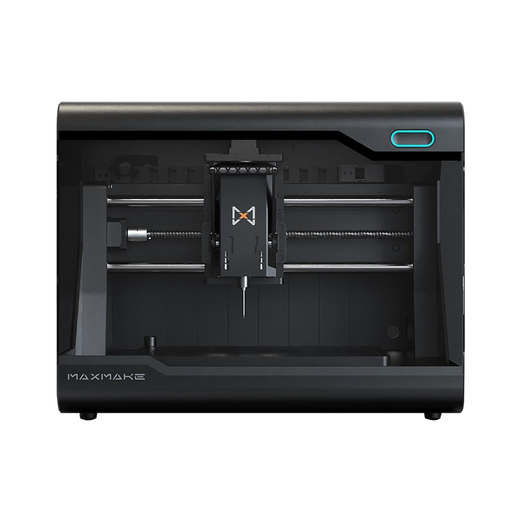
HiMill D1S - Pro Desktop CNC with Ball Screws & QTC
Connect with the MAXMAKE community
Share your projects, discover new ideas, and connect with other makers.
Join Our Community
Share projects, ask questions, connect with makers