Best CAM Software for Beginners in 2026
Abstract
In 2026, more beginners than ever are entering the world of CNC machining. While machines often get the most attention, the real key to successful results is CAM software. CAM (Computer-Aided Manufacturing) transforms design models into toolpaths and generates executable G-code, acting as the bridge between CAD and the CNC machine. This guide analyzes the best CAM software for beginners—including Fusion 360, VCarve, Easel, FreeCAD, Carbide Create, and MaxmakeLab—comparing their strengths, learning curves, and ideal use cases. We also provide a brief overview of CNC control software to help new users understand the complete machining workflow.
What Is CAM Software and Why Is It the Core of CNC for Beginners?
In any complete digital manufacturing workflow, CAM is the logical engine that determines how a part is machined. CAD defines the geometry, CNC control software executes motion commands, but CAM determines how the tool moves, how material is removed, and in what sequence operations are performed.
For beginners, the main challenges of CAM usually fall into three areas. The first is selecting the appropriate machining strategy, such as contouring, pocketing, drilling, or 3D surface machining. The second involves setting parameters like feed rate, spindle speed, step‑down, and step‑over. The third is understanding and verifying toolpath simulations before running a job.
A beginner‑friendly CAM solution should help users understand these machining principles instead of overwhelming them with complex feature sets. In 2026, the CAM software market is clearly segmented, with different tools designed for different types of users. Understanding these differences is essential when choosing the right software.

Overview of the Best CAM Software for Beginners in 2026
Fusion 360 (CAM Module)
Fusion 360 is one of the most widely used integrated CAD/CAM platforms. It combines modeling and toolpath generation within a single environment, making it attractive for users who want to learn both design and manufacturing together.
Its strengths include comprehensive functionality, support for 2D, 2.5D, and 3D machining, and a mature simulation system. It also offers a personal license tier, making it accessible for hobbyists and learners.
However, Fusion 360 has a steeper learning curve compared to lightweight CAM tools. Its interface can feel complex, and its parameter system is more engineering-oriented. Complete beginners may need additional time to fully understand machining logic within the software.

VCarve
VCarve is especially popular in woodworking and sign-making industries. It excels at 2D and 2.5D operations, particularly V-carving and vector‑based designs.
Its interface is clear and workflow‑oriented, making it easier for beginners focused on woodworking projects. Toolpath generation is intuitive, and the learning curve is manageable.
The limitation lies in advanced 3D surface machining capabilities. It is also a paid commercial product, which may be a consideration for hobbyists.

Easel
Easel is a cloud-based CAD/CAM platform designed for simplicity. Users can access it directly through a browser without installing complex software.
Its major advantage is ease of use. The workflow is highly simplified, allowing beginners to create designs and generate toolpaths through a drag-and-drop interface. It is well suited for educational settings and DIY users.
However, Easel offers limited depth for advanced 3D machining or fine parameter control. As users progress, they may outgrow its capabilities.

FreeCAD (Path Workbench)
FreeCAD is an open-source CAD platform that includes CAM functionality through its Path Workbench module.
Its biggest advantage is cost—it is completely free. It also supports parametric modeling, which appeals to technically inclined users.
That said, its interface and workflow are less intuitive compared to commercial CAM tools. Documentation can be fragmented, and the learning curve is steeper for complete beginners.

Carbide Create
Carbide Create is a lightweight CAM solution designed for accessibility and ease of use.
It provides solid 2D machining features and simplifies parameter settings, allowing beginners to generate their first toolpaths quickly. It is particularly suitable for desktop CNC users.
However, its advanced 3D and multi‑axis capabilities are limited compared to more powerful CAM platforms.

Mastercam Router / Industrial CAM
Mastercam represents industrial-grade CAM software. It supports advanced toolpath strategies, multi‑axis machining, and production‑level optimization.
While powerful, it is expensive and complex, making it unsuitable as an entry‑level CAM tool for beginners.

MaxmakeLab CAM Module
MaxmakeLab is designed for desktop CNC users and integrates both CAM and CNC control functions into a single environment. Its goal is to streamline the workflow from design import to machining execution.
The CAM module is built specifically for desktop CNC workflows. It already supports essential toolpath generation and simulation, with a strong emphasis on logical workflow and ease of understanding for beginners. The roadmap includes expanded machining strategies and smarter parameter suggestions.
Compared to industrial CAM platforms, MaxmakeLab focuses on desktop CNC scenarios, prioritizing simplicity and reliability over feature overload. As updates continue, its CAM functionality will steadily evolve to provide a more stable and efficient integrated experience.

CAM Software Comparison Table (2026 Edition)
| Software | Best For | Ease of Use | 2D/2.5D | 3D | Learning Curve | Pricing | Key Strength | Limitation |
|---|---|---|---|---|---|---|---|---|
| Fusion 360 | Long-term learners | Medium | Strong | Strong | Moderate | Subscription | Full CAD/CAM integration | Complex interface |
| VCarve | Woodworking | High | Very Strong | Limited | Moderate | Paid | Excellent vector & V-carving | Cost, limited 3D |
| Easel | Complete beginners | Very High | Strong | Limited | Low | Free/Subscription | Browser-based, easy workflow | Limited advanced features |
| FreeCAD | Technical users | Medium-Low | Strong | Supported | Moderate-High | Free | Open-source, parametric | Less intuitive |
| Carbide Create | Entry-level desktop CNC | High | Strong | Limited | Low | Free/Paid | Beginner friendly | Limited scalability |
| Mastercam | Industrial users | Low | Strong | Very Strong | High | Premium | Advanced machining | Not beginner-friendly |
| MaxmakeLab | Desktop CNC users | High | Strong | Expanding | Low | Included with device | Integrated workflow | CAM still evolving |
How Beginners Should Choose a CAM Tool in 2026
The best CAM software for beginners is not necessarily the most powerful one, but the one that aligns with current learning goals.
If you plan to grow into complex 3D machining and want a long-term solution, Fusion 360 offers strong scalability. If your focus is woodworking and decorative projects, VCarve provides specialized strengths. If you are completely new and want to finish your first project quickly, Easel or Carbide Create may offer the smoothest start.
For technically inclined users interested in open‑source ecosystems, FreeCAD provides flexibility. If you use Maxmake hardware and prefer an integrated workflow, MaxmakeLab reduces software switching and simplifies the learning process.
For desktop CNC beginners, we recommend starting with a tool that matches your immediate project needs. Easel, Carbide Create, or MaxmakeLab all provide excellent starting points depending on your workflow preference.
Appendix: The Role of CNC Control Software
After CAM software generates G-code, CNC control software executes it. Control software reads G-code commands, translates them into motor movements, and manages operations such as homing, limit detection, spindle control, and feed rate overrides.
It is important to understand that CNC control software does not calculate or modify toolpaths. If a toolpath contains errors, those must be corrected in the CAM stage. Control software strictly handles execution.
In recent years, integrated solutions combining CAM and control software have become more common, especially in desktop CNC environments. These systems reduce file transfer steps and lower the risk of user error. While control software is not the main focus of this guide, understanding its role helps beginners grasp the full CNC workflow.
Conclusion: The Best CAM Software Is the One That Helps You Complete Your First Successful Project
When evaluating the best CAM software for beginners in 2026, focus on clarity, simulation reliability, and learning curve—not just feature count.
CAM is the most critical step in the CNC learning journey. Choosing a tool that helps you understand toolpath logic and machining principles will accelerate your progress far more than selecting the most advanced platform.
With the right CAM software, your first successful machining project becomes more than a finished part—it becomes the foundation of your CNC expertise.
Frequently Asked Questions (FAQ)
What is the difference between CAM software and CNC control software?
CAM software generates toolpaths and outputs G-code based on your design and machining parameters. CNC control software reads that G-code and drives the machine’s motors to execute the job. CAM handles planning; control software handles execution.
Should beginners learn CAD or CAM first?
Both are important, but CAM is often more critical for machining success. Even with an existing design file, you cannot machine a part without generating correct toolpaths. Starting with simple 2D contour operations is recommended.
What is the easiest CAM software for beginners in 2026?
Easel and Carbide Create are generally considered the easiest to learn due to their simplified interfaces. Fusion 360 offers more advanced features but requires a longer learning period.
Is free CAM software suitable for long-term use?
Free solutions like FreeCAD can meet basic needs, but as machining complexity increases, you may encounter feature limitations. Free software is excellent for learning, but long-term suitability depends on project requirements.
Is more complex CAM software always better?
Not necessarily. For beginners, excessive complexity can slow learning. Start with clear, intuitive software, and upgrade as your skills and machining needs grow.
Is MaxmakeLab’s CAM module fully mature?
MaxmakeLab supports all essential toolpath generation and simulation features for desktop CNC applications. Its integrated CAM module is built for the needs of desktop users, with regular updates that expand capabilities and improve the user experience.
What should beginners focus on when choosing CAM software?
Beginners should prioritize software that provides a clear machining workflow, reliable simulation features, and logical parameter settings. A good entry‑level CAM tool should help users understand how toolpaths are generated and how machining parameters affect the final result. Software that emphasizes clarity and learning value is often more beneficial than one that simply offers a long list of advanced features.
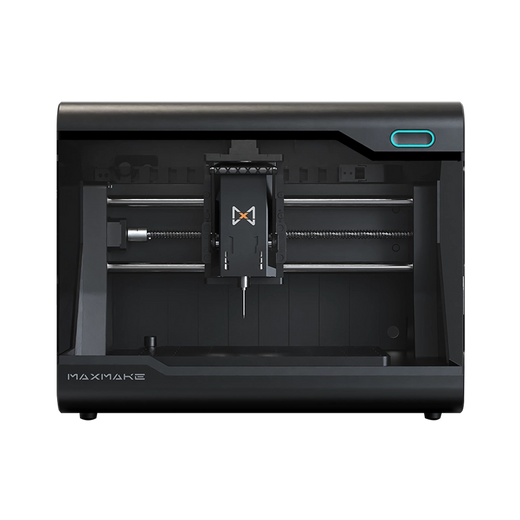
HiMill D1S - Pro Desktop CNC with Ball Screws & QTC
Connect with the MAXMAKE community
Share your projects, discover new ideas, and connect with other makers.
Join Our Community
Share projects, ask questions, connect with makers