CNC Router vs CNC Mill: Which Desktop CNC Machine Should You Buy?
If you are comparing a CNC router vs CNC mill, the real question is not which machine is “better.” It is which machine matches your material, tolerance, workspace, and budget. A CNC router is usually better for wood, panels, acrylic, signs, and larger 2.5D projects. A CNC mill is usually better for aluminum parts, tighter tolerances, metal blocks, pockets, holes, and precision fixtures.
The difference between a CNC router and a CNC mill comes down to structure, spindle behavior, torque, rigidity, and the way each machine handles cutting forces. Most online guides explain this from an industrial perspective, but desktop buyers have a different problem: they often want one compact machine that can handle woodworking and occasional aluminum work without jumping straight into an expensive benchtop CNC mill.
This guide explains cnc router vs mill differences from a desktop CNC perspective, then gives you a practical buying framework for deciding whether a desktop CNC router, a desktop CNC mill, or a rigid bridge-style machine makes the most sense.
For a broader machine shortlist, see our Desktop CNC Buying Guide 2026.
CNC Router vs CNC Mill: The Short Answer
If you only want the practical answer, the cnc router vs mill decision comes down to two questions: what material do you cut most, and how tight does the tolerance need to be?
Question 1: What are you mainly cutting?
- Mostly wood, panels, acrylic, foam, MDF, engraving, and signs → lean CNC Router
- Mostly aluminum functional parts, brass parts, small steel samples, precision metal blocks → lean CNC Mill
Question 2: How tight does your tolerance need to be?
- ±0.25 mm (about ±0.010") is enough (decorative parts, wood joinery, general jigs) → most desktop routers cover it
- You regularly need ±0.025 mm (about ±0.001") or tighter (mating parts, shaft and hole fits, precision mechanisms) → lean mill
Note: values are typical ranges and experiences; models vary a lot — check the specific machine's specs and real cases before deciding. Reference ranges: desktop routers typically hold ±0.13–0.25 mm (±0.005–0.010"); desktop mills typically hold ±0.025–0.13 mm (±0.001–0.005").
Our recommendation: within a desktop budget, most hobbyists are better off starting with a stiffer desktop CNC router — fast on wood, and capable of light aluminum. Only people with a clear, long-term need for metal functional parts or precision work really need a mill-first route.
What Is a Desktop CNC Router Best For?
A desktop CNC router is best for wood, plywood, MDF, acrylic, plastic, foam, engraving, signs, and larger flat projects. In the cnc router vs mill decision, the router usually wins when the workpiece is wide, flat, soft, or sheet-based.
Desktop Characteristics
- Structure: gantry-style, travel and speed first; rigidity depends on the frame, gantry beam, rails and sliders, joints, and total weight.
- Spindle: high-speed and relatively low-torque (typically 10,000–30,000 RPM); better suited to wood, plastic, and acrylic.
What It's Good At
- Wood and panel cutting (furniture parts, fixture boards, templates), sign engraving, 2.5D pockets and contours
- At the same budget you usually get a bigger working area and you can be productive sooner
Where It Falls Short
- Harder metals and deep cavities are more difficult (more deflection and vibration)
- Size control is usually "good enough": typically ±0.13–0.25 mm (heavily dependent on machine rigidity and process — don't treat repeatability specs as real machining tolerance)

What Is a Desktop CNC Mill Best For?
A desktop CNC mill is best for aluminum functional parts, brass components, precision pockets, drilled holes, fixtures, and small metal blocks. In the cnc router vs cnc mill comparison, the mill usually wins when rigidity, torque, and dimensional accuracy matter more than work area.
Desktop Characteristics
- Structure: column or box layouts are more common, emphasizing mass, rigidity, and vibration damping
- Spindle: lower-speed and higher-torque (typically 1,000–10,000 RPM); better for stable cuts in aluminum, brass, and similar metals
What It's Good At
- Aluminum functional parts, fixtures, pockets and cavities, precision prototypes
- Easier to reach a controlled size range: typically ±0.025–0.13 mm (still depends on the machine, fixturing, tooling, and parameters)
Where It Falls Short
- Smaller travel at the same budget (rigidity traded for size)
- Higher supporting costs (vises, fixtures, tramming tools, chip and coolant management)
- A steeper learning curve: fixturing and cut parameters are more sensitive

CNC Router vs CNC Mill: Desktop Comparison Table
This table is the desktop-level cnc router vs cnc mill reference, including benchtop cnc mill data — no industrial 4'×8' beds to skew the picture.
| Dimension | Desktop CNC Router | Desktop CNC Mill |
|---|---|---|
| Main role | Wood/panel cutting, engraving, 2.5D work | Metal parts, precision machining, prototyping / small batch |
| Typical frame | Gantry-style, built for travel and speed | Column/box-style, built for rigidity and stability |
| Spindle profile | High-speed first (typically 10k-30k RPM) | Low-speed, high-torque more common (typically 1k-10k RPM) |
| Torque fit | Better for soft materials, shallow cuts, high-speed surfacing | Better for metal cutting and higher cutting forces |
| Rigidity (relative) | Usually weaker at the same budget | Usually stronger at the same budget |
| Typical tolerance | About 0.13-0.25 mm (model and process dependent) | 0.025-0.13 mm more achievable (model and process dependent) |
| Typical workpiece | Sheets, surface work, contour cutting, shallow pockets | Blocks, cavities, hole patterns, mating parts |
| Material range | Wood, MDF, acrylic, foam, some plastics; light aluminum on some models | Aluminum, brass, engineering plastics; steel/titanium only on a few models with very conservative parameters (highly model- and process-dependent; not a recommended main use case) |
| Travel / table size | Usually larger at the same budget | Usually smaller at the same budget |
| Speed feel | Fast rapids, efficient on panels | More stable cutting, but the overall pace is usually slower |
| Noise profile | High-speed spindle + dust system gives sharper noise | Lower-speed spindle sounds deeper, but metal cutting and swarf add noise |
| Desktop price band (reference) | Typically $200-$5,000 by tier | Usually from about $3,000 up, often more with tooling |
| Fixturing difficulty | Most projects fixture simply (precision dependent) | Fixturing and tramming are more critical and time-consuming |
| Learning curve | Closer to a cut-and-engrave workflow, beginner-friendly | Higher CAM and process sensitivity, costlier trial-and-error |
| Best for | Woodworkers, makers, signs and crafts, small jigs | Clear metal-part needs, precision prototypes, small functional parts |
| One-machine-two-jobs potential | Depends on rigidity, spindle, and process (light aluminum OK) | Natively metal-oriented, but can do wood (efficiency and dust aside) |
Which Desktop Machine Fits You? Real Scenarios
Still asking which is better cnc router or mill? Instead of reading more specs, match your situation. These are the seven most common desktop buying scenarios:
| Your main scenario | Lean toward | Why (desktop-level reasons) |
|---|---|---|
| Woodworking / furniture parts, panel cutouts, fixture boards | CNC Router | Larger travel plus speed on panels; soft materials like high-RPM spindles |
| Mostly aluminum functional parts (brackets, connectors, small structures) | CNC Mill | Metal cutting needs more rigidity and a suitable torque curve; stability matters more than area |
| Mixed wood + metal (hobbyist: wood first, occasional aluminum) | Stiffer CNC Router (light aluminum) or a mill-leaning bridge machine | It comes down to rigidity, process, and tool-change efficiency - you do not need a mill just for occasional brackets |
| Precision prototypes (hole fits, assemblies, dimensional consistency first) | CNC Mill | Easier to make size control repeatable; fixturing and tramming are more systematic |
| Pure engraving / plaques / reliefs (crafts, signage, decor) | CNC Router | Fast, friendlier ecosystem, workflow closer to engraving software |
| Budget under $1,500, just starting out | CNC Router | More choices in this band; tooling and accessories stay easier on budget |
| Very little space / noise-sensitive (apartment, shared space) | Depends on spindle and enclosure | Router high-frequency noise and dust matter most; a mill may need coolant, chips are sharper, but enclosure is easier |
If your needs cover both woodworking efficiency and the occasional aluminum part, jump to the "one machine, two jobs" section below.
Can a CNC Router Mill Aluminum?
Yes, a CNC router can mill aluminum, but only within the right limits. For desktop users, the realistic answer is light aluminum work: shallow passes, sharp tools, strong workholding, good chip evacuation, and a machine frame rigid enough to control vibration.
This is where the cnc router vs milling machine distinction matters. A milling machine is built around metal-cutting rigidity and torque. A router is built around speed, work area, and softer materials. A rigid desktop CNC router can handle occasional aluminum parts, but it should not be treated like a full replacement for a benchtop CNC mill if your daily work is deep pockets, tight holes, or production metal parts.
What a Router Needs to Cut Aluminum
To cut aluminum reliably, a desktop CNC router needs more than high RPM. Pay attention to these factors:
- Rigidity: the frame, gantry, rails, and total weight must control vibration.
- Usable spindle power: do not only look at max RPM; aluminum needs stable output in the RPM range you actually use.
- Workholding: the material must be fixed firmly enough to resist cutting force.
- Chip evacuation: aluminum chips need to clear properly, or finish quality and tool life suffer.
- Toolpath strategy: shallow passes, sensible feeds, step-downs, and finishing passes matter more than aggressive cutting.
Can a CNC Router Do the Same Work as a Mill?
Partly, but not completely. A capable desktop CNC router can cover wood, plastics, engraving, panels, and occasional light aluminum. A CNC mill is still the better choice for frequent aluminum parts, tighter tolerances, deep cavities, repeated hole patterns, and more demanding metal work.
So the practical answer is this: if your projects are mostly wood, acrylic, panels, signs, and occasional aluminum, a rigid desktop CNC router may be the better value. If your projects are mostly metal functional parts, a desktop CNC mill is the safer long-term choice.
Where HiMill D1S Fits
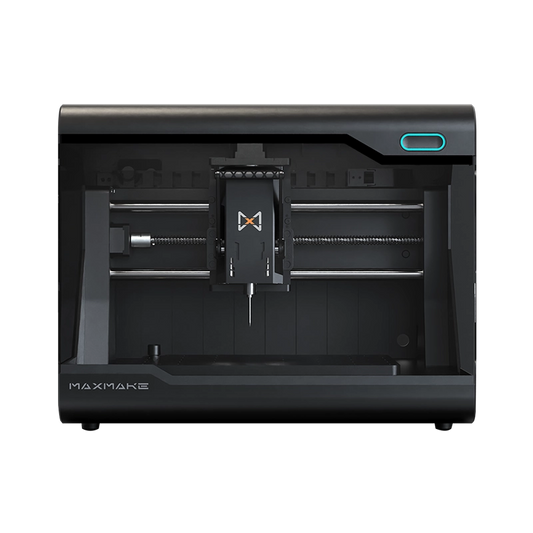
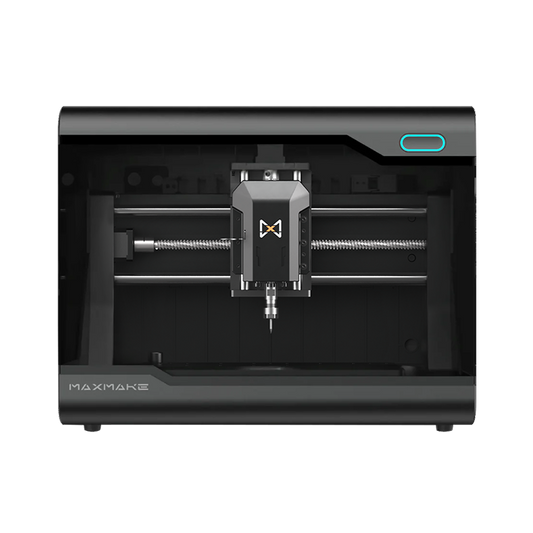
For users who mainly want a desktop CNC router but also need occasional aluminum capability, a bridge-style machine can make sense. HiMill D1S fits this position because it is better framed as a rigid desktop CNC router for users who want woodworking flexibility plus light aluminum machining capability, not as a full industrial CNC mill replacement.
The QTC quick tool change system is useful in this context because aluminum parts often need multiple tools for roughing, cleanup, drilling, and chamfering. Reducing tool-change friction makes mixed-material desktop work easier, but it does not remove the need for correct tooling, workholding, and cutting parameters.
Where a Router Still Falls Short
Even a capable desktop router has limits:
- Deep cavities and long tool reach can amplify vibration and deflection.
- Steel, titanium, and heavy continuous cutting are usually outside a desktop router’s comfort zone.
- Very tight tolerances, such as ±0.025 mm, are more realistic on a mill-oriented setup.
- Repeated drilling, reaming, tapping, and precision hole patterns are usually easier to control on a CNC mill.
Desktop CNC Mill vs Router: Cost of Ownership
Most people only compare the machine price, but the real buying experience depends on the whole system cost. Here's the desktop-level breakdown:
| Cost item | Desktop CNC Router (typical) | Desktop CNC Mill (typical) |
|---|---|---|
| Machine price (reference only) | Typically $200-$5,000 by tier | Usually from about $3,000 up, often more with tooling |
| Tooling wear | Mostly soft materials; tool life is friendlier | Metal tooling depends on parameters and coolant; the trial period burns more |
| Fixtures / workholding | Panel clamps, vacuum tables, and fixture boards are common | Vises, clamps, parallels, and tramming tools are near-mandatory |
| Maintenance & cleanup | Dust management is the focus (vacuum, extraction) | Chip removal, coolant and lubrication, cleaning, and rust prevention matter more |
| Software & workflow | Engraving and cutting ecosystems are usually friendlier | CAM parameters are more sensitive; process knowledge weighs more |
| Learning investment (time) | Faster results, less frustration | Easier to hit parameter or fixturing issues; needs more systematic learning |
Budget tiers in plain terms: routers span the $200–$1,500 and $1,500–$5,000 bands; usable desktop and benchtop CNC mills often start around $3,000, and typical purchases land higher once tooling and fixturing are included (models vary — check the actual product and config).
Learning Curve and Software Compared
Both machine types get the same "is it hard to learn?" question, but the real difference is the workflow. For beginners considering a desktop CNC mill, the main hurdle is usually not the software alone, but the full process: fixturing, CAM strategy, tool selection, and cutting parameters. A router workflow is usually lighter and easier to learn first.
Router: More Like "Design → Toolpath → Cut/Engrave"
- Projects are mostly 2D/2.5D: contour cutting, pockets, engraving, reliefs
- You see finished parts faster
- Failures cost less: wood, MDF, and acrylic trial-and-error is cheaper than metal
- Software is lighter to pick up: many people finish plenty of projects with entry-level tools before moving to stronger CAD/CAM
Mill: More Like "Process Engineering"
- You have to get fixturing rigidity, tramming, datums, tool reach, cut parameters, and operation sequence right
- Parameters leave less room for error: bad feed, speed, or depth quickly shows up as chatter, broken tools, poor finish, or unstable dimensions
- You'll hit "why is this hole off by 0.05 mm?" more often — and you'll need a methodical approach to troubleshoot
For software-specific setup decisions, see our CNC software comparison guide.
Frequently Asked Questions
Common questions covering the most important cnc router vs milling machine searches, answered as directly as possible.
What is the difference between a CNC router and a CNC mill?
The core difference is design intent and structure. A router favors high-speed work on sheets and soft materials, typically with a gantry-style frame and high-RPM spindle. A mill favors metal cutting and precision, usually with a stiffer structure and more torque-friendly spindle. At the desktop level, this means routers usually give more travel and speed for the budget, while mills give more stable size control and better metal capability.
Is CNC the same as milling?
No. CNC means computer numerical control, which is a way to control machine movement. Milling is a cutting process. A CNC mill uses CNC control to perform milling operations, but CNC can also control routers, lathes, lasers, plasma cutters, and other machines.
Which is better for a desktop: CNC router or CNC mill?
For most desktop users, a CNC router is better if the main work is wood, panels, acrylic, signs, engraving, and general maker projects. A CNC mill is better if the main work is aluminum parts, tighter tolerances, pockets, holes, fixtures, and precision prototypes.
Can a CNC router mill aluminum?
Yes, a CNC router can mill aluminum, but realistically for light aluminum, shallow depths, and sensible parameters. Whether it works well depends on rigidity, spindle behavior, fixturing, chip clearance, tooling, and toolpath strategy. The practical path is to use the router as your woodworking main machine and treat aluminum as occasional functional-part work, not full-time metal milling.
Can a CNC router do the same as a mill?
Only partly. A rigid desktop CNC router can do some mill-like work, especially light aluminum parts. But a CNC mill is still better for repeated metal parts, deep pockets, tight holes, precision fixtures, and tighter tolerances.
How much does a desktop CNC mill cost?
Prices vary widely depending on rigidity, spindle, enclosure, automation, and accessories. Benchtop CNC mills usually start around $3,000 and typical purchases often land higher once tooling and fixturing are included. Do not compare the bare machine only; add vises, fixtures, tooling, tramming tools, and chip or coolant management.
Do I need a CNC mill or router for aluminum parts?
If aluminum is occasional, small, and not extremely tolerance-sensitive, a rigid desktop CNC router can be enough. If aluminum parts are your main focus, or you need repeatable precision, deep pockets, tight holes, or small-batch production, a CNC mill is the better choice.
What are the disadvantages of using a CNC router?
The main disadvantages of using a CNC router are lower rigidity, less low-speed torque, more vibration under heavier cuts, and weaker performance in hard metals or deep cavities. Routers are excellent for wood, panels, plastics, and engraving, but they are not always the best choice for precision metal work.
Should I buy a CNC router or mill first?
If you are still exploring, your direction is uncertain, and your budget is entry-level, buy a router first: broader applications, friendlier learning curve, and cheaper mistakes. If you already know you will be doing long-term metal functional parts with tight tolerances, a mill-first route can save you from buying twice.
Final Verdict
Back to desktop reality: if your projects are mostly woodworking, panels, and engraving — with the occasional aluminum part — most people are better served by a stiffer desktop CNC router, treating aluminum as an occasional, light-duty extra with realistic expectations.
If your goal from day one is metal functional parts, tight tolerances, deep cavities, and hole patterns — and you're ready to invest in tooling and learning — a desktop CNC mill is the better fit for long-term efficiency and consistency.
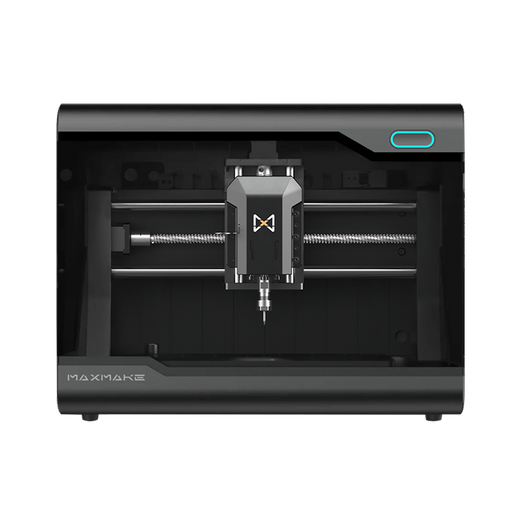
HiMill D1 Desktop CNC Machine
Connect with the MAXMAKE community
Share your projects, discover new ideas, and connect with other makers.
Join Our Community
Share projects, ask questions, connect with makers