Best Desktop CNC Machines in 2026: Buying Guide & Comparison
Introduction
Desktop CNC is the fastest-growing corner of the hobby machining market, and the catalog keeps expanding every year. Whether this is your first hobby cnc machine or an upgrade to a more capable desktop cnc machine, prices run from a few hundred dollars for an entry-level router to several thousand for a benchtop mill, and spec sheets don't make the decision any easier. Before you start comparing spindle wattage and ball screw diameters, settle a simpler question first: which desktop cnc machine should I buy — and what do I actually want to make?
The best machine for you — whether that's a small cnc machine for a corner of your home workshop or a larger desktop model — is the one that matches your materials, your part sizes, and your workflow — not the one with the longest feature list. A woodworker, a prototype shop, and a small-parts supplier will reach for very different machines.
This 2026 buying guide reviews six desktop CNC machines currently available on the market, plus the selection criteria that matter most: frame rigidity, working area, spindle, motion system, software, and upgrade path. Each machine is assessed on what it does well, where it falls short, and which user it fits.
What Is a Desktop CNC Machine?
A desktop CNC — also called a desktop cnc machine or a small cnc machine — is a computer-controlled mill or router sized for a workbench rather than a factory floor. It reads toolpaths generated in CAM software and moves a spindle across a workpiece, removing material in controlled passes. The category spans $200 hobby routers to $10,000 benchtop mills; what they share is a desktop footprint and the ability to cut wood, plastics, acrylic, aluminum, and other non-ferrous metals.
The differences that actually matter between machines come down to five things:
- Frame rigidity — how much the machine flexes under cutting load. This is the single biggest factor in whether it can handle aluminum.
- Motion system — ball screws and linear guides hold accuracy better than lead screws and v-wheels.
- Spindle — power and duty cycle determine how fast you can remove material and for how long.
- Working area — the biggest part you can fit, in all three axes.
- Software — how smooth the path is from CAD model to finished cut.
Entry-level machines cut wood and plastic reliably and are fine for learning the workflow. Once you need dependable aluminum parts, repeatable tolerances, or production-style routines, the machine has to be built differently — and the price reflects that.
Desktop CNC Machine vs CNC Router: What's the Difference?
"Desktop CNC" gets used loosely, but a mill and a router are not the same tool, and the distinction matters when you're deciding what to buy.
A desktop cnc router is built for speed over soft materials — wood, plywood, foam, plastics, composites. They typically have larger beds, move fast, and dominate woodworking, sign making, and furniture work. A router can take light passes on aluminum, but it's not what it's designed for.
Desktop CNC mills trade speed for rigidity. The frame is heavier, the motion system is stiffer, and the machine cuts harder materials at lower feed rates. That's what you want for aluminum parts, precision components, and anything where tolerance matters.
Two questions settle the choice: what are you cutting, and how much precision do you need? Large wooden panels or decorative work points to a router. Prototypes, metal parts, and repeatable tolerances point to a mill.
| Specification | Desktop CNC (Mill) | CNC Router |
|---|---|---|
| Main Purpose | Precision machining | Cutting & engraving |
| Best Material | Metal, plastics, wood | Wood, acrylic |
| Accuracy | Higher precision | General cutting |
| Typical User | Maker / engineer | Woodworker |
How Much Does a Desktop CNC Machine Cost in 2026?
Desktop CNC pricing falls into a few broad bands, and the bands line up with capability. Machines under $600 are budget cnc machines — routers that cut wood and plastic; expect light engraving on aluminum at most. The $800–$1,500 range is where you start to see rigid frames, real spindles, and ball screws — machines that handle aluminum as a regular part of the workload. Above $3,000 you're in benchtop-mill territory: bigger, stiffer, and aimed at small businesses and production work.
The machine is not the whole cost. Tooling, workholding, dust collection, software, and materials typically add 20–30% on top of the machine price. Choosing cnc router bits and tool selection and the right cnc accessories is part of that budget. Buying slightly above your current needs is usually cheaper than upgrading a year later.
| Tier | Price Range | Best For | Examples |
|---|---|---|---|
| Beginner | $150–$600 | Learning, DIY, light engraving | Genmitsu |
| Maker | $800–$1,500 | Hobby projects, serious creation | HiMill D1S, Makera Z1 |
| Advanced Maker | $1,500–$3,000 | Functional parts, aluminum machining | Carvera Air |
| Professional | $3,000+ | Business, education, workshop | Bantam, Tormach |
Best Desktop CNC Machines in 2026 Comparison
The table below condenses the six machines into the specs that matter most for most buyers — price, working area, and aluminum capability. The detailed breakdown follows.
| Machine | Typical Price | Best For | Working Area | Aluminum Capability |
|---|---|---|---|---|
| Genmitsu Cubiko | Around $500 | Learning CNC fundamentals | 150 × 110 × 40 mm | Light engraving at most |
| Makera Z1 | Around $1,000 | Precision small parts, PCB work | 200 × 200 × 100 mm | Good for small aluminum parts |
| HiMill D1S | Around $1,000 | Aluminum parts, functional prototypes | 280 × 200 × 80 mm | Strong — 250W spindle, ball screws |
| Carvera Air | Around $2,500 | Precision prototyping, complete workflow | 300 × 200 × 130 mm | Good within its working area |
| Nestworks C500 | Around $4,500 | Small-batch production, ATC | 230 × 213 × 128 mm | Strong — 800W ATC spindle |
| Xmachine | Around $6,000 (expected) | 5-axis complex parts | 156 × 203 × 125 mm | Strong — 1.5 kW spindle, 5-axis |
Genmitsu SainSmart Cubiko — Best Budget Desktop CNC for Beginners
The Cubiko is Genmitsu/SainSmart's entry-level desktop CNC, targeting first-time users, students, and anyone who wants to learn the workflow without committing serious money. For a cnc machine for beginners — or anyone looking for an entry level cnc — it's the most affordable way to get through the full CNC loop: CAD, CAM, setup, and cutting, without a big outlay.
At 7.85 kg with a sheet-metal frame and a 775-motor spindle, it's light enough for a desk or a classroom bench. The 150 × 110 × 40 mm working area is small, and best suited to engraving, test pieces, and small projects.
The lightweight frame and 775 motor keep it to softer materials and light engraving. For regular aluminum work or larger parts, a more rigid machine is a better fit.

Best for: the most affordable way to learn CNC fundamentals and finish small projects.
Consider another machine if: your main goal is machining aluminum, larger parts, or higher-precision work.
Makera Z1 — Precision Desktop CNC for Detailed Machining
The Makera Z1 is a precision-focused desktop CNC for makers who need accuracy and good surface quality in a compact package. Released in 2025, it targets functional prototypes, small precision parts, PCB work, and detailed components — jobs where accuracy matters more than working area.
The cast-aluminum frame and linear guide system give it noticeably more rigidity than typical entry-level machines. The 200 × 200 × 100 mm working area, a 150W brushless spindle, and the Quick Tool Change (QTC) system cover a wide range of small-scale work.
Its other strength is software. Makera ships its own CAM and controller, which flattens the learning curve for beginners and intermediates. The trade-off is the compact envelope: it's a small-precision machine, not a production tool. Larger functional parts will push past its limits.

Best for: makers who need a compact, precise machine for prototypes, PCB work, small aluminum parts, and detailed projects.
Consider another machine if: you need a larger working area, heavier material removal, or frequent machining of bigger parts.
HiMill D1S — Advanced Desktop CNC for Functional Parts and Aluminum
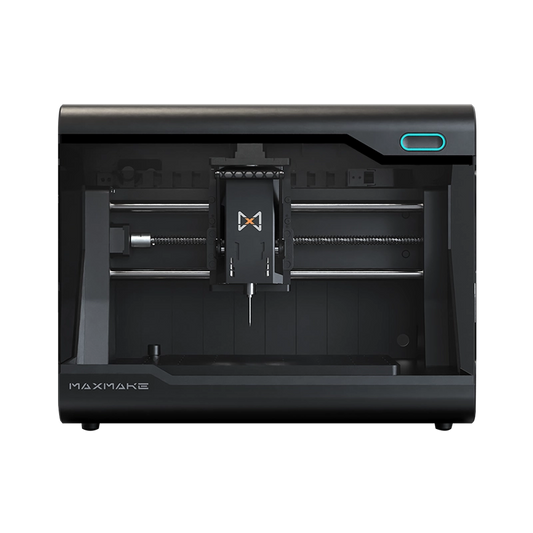
The HiMill D1S is aimed at makers, engineers, and product designers who have moved past entry-level learning and need a machine that can produce functional parts in a wider range of materials. For hands-on detail, see our HiMill D1S review.
Its cast-aluminum frame, 280 × 200 × 80 mm working area, and 250W brushless spindle with QTC give it noticeably more cutting capacity than smaller desktop machines. The 1605 ball screw motion system and ±0.02 mm precision keep results consistent, particularly on aluminum parts and functional prototypes.
The D1S offers more room than compact machines while staying at a footprint that fits a personal workshop, studio, or maker space — a serious home cnc machine with the rigidity to cut aluminum parts in a home workshop. Its accessory ecosystem — 4th axis, 3D probe, laser module, dust suction, vacuum table — lets you expand capability as your projects grow.

Best for: advanced makers and engineers who need a desktop CNC for aluminum machining, functional prototypes, and larger precision projects.
Consider another machine if: you only need basic CNC learning, engraving, or small hobby projects where a cheaper machine is enough.
HiMill D1S vs Makera Z1: Which One Fits Your Needs?
The Makera Z1 and HiMill D1S sit at a similar price point and are the two machines most buyers will shortlist, but they're optimized for different work.
The Z1 leans toward precision and ease of use on smaller, detailed jobs. Its compact footprint, accurate motion, and integrated software make it a strong choice for PCB work, small prototypes, engraving, and fine components.
The D1S is built for more workspace and stronger cutting. The larger working area, 250W spindle, and 1605 ball screw system give it more headroom for functional prototypes, aluminum parts, and jobs that need sustained cutting performance.
| Specification | Makera Z1 | HiMill D1S |
|---|---|---|
| Best For | Precision projects, PCB, detailed parts | Aluminum machining, functional prototypes |
| Price | Around $1000 | Around $1000 |
| Working Area | 200 × 200 × 100 mm | 280 × 200 × 80 mm |
| Machine Structure | Cast Aluminum Frame | Cast Aluminum Frame |
| Spindle | 150W Brushless Motor with QTC | 250W Brushless Motor with QTC |
| Motion System | Acme Lead Screw | 1605 Ball Screw |
| Precision | ±0.02 mm | ±0.02 mm |
| Weight | 17 kg | 19 kg |
Choose Makera Z1 if:
- Precision on small, detailed parts is your priority
- Your work is mostly PCB machining, engraving, or compact prototypes
- You want a polished software experience in a small footprint
Choose HiMill D1S if:
- Aluminum and functional parts are on your list
- You need a larger working area for bigger projects
- You want a platform you can grow into as your skills improve
Both are good machines; they serve different maker profiles. The right call depends less on specs and more on what you plan to make.
Carvera Air — Premium Desktop CNC with a Complete Ecosystem
The Carvera Air is Makera's premium desktop CNC, aimed at makers, educators, and creators who want a complete workflow without stepping up to industrial equipment. Released in 2024, it combines a larger working area with a rigid mechanical structure and an integrated software stack.
Its 300 × 200 × 130 mm working area is among the largest in the category, and the cast-aluminum frame, 1605 ball screws, linear guides, and 200W QTC spindle hold a good balance of precision, stability, and ease of use. With ±0.01 mm precision and support for a 4th axis, Z probe, laser module, dust suction, and vacuum table, it handles PCB work, small functional parts, engraving, and precision prototyping well.
The main draw is the complete ecosystem — Makera Controller and Makera CAM give a more streamlined workflow than most DIY CNC setups. The trade-off is price: at Around $2,500, it's positioned as a premium desktop CNC. If maximum cutting power or heavy aluminum machining is the priority, a capability-first machine may be a better fit.

Best for: makers and educators who value precision, ease of use, and a complete workflow for prototyping, PCB work, and detailed projects.
Consider another machine if: you need aggressive aluminum machining, larger functional parts, or production-oriented throughput.
Nestworks C500 — Desktop CNC for Small-Scale Manufacturing
The Nestworks C500 bridges desktop CNC and small-scale manufacturing. Released in 2025, it targets advanced makers, workshops, and small businesses that need more cutting capacity than typical hobby machines.
The defining feature is the 800W ATC spindle on a cast-aluminum frame with 1605 ball screws. The automatic tool changer cuts manual tool-change downtime, which matters for repeated jobs, functional parts, and more complex work.
With a 230 × 213 × 128 mm working area, ±0.02 mm precision, and a 91 kg weight, the C500 is built for stability and machining performance. It's suited to aluminum parts, engineering prototypes, and small-batch production.
Expect a steeper learning curve than a 3D printer — it's still a CNC — but ATC, bundled CAM, and workflow accessories take some of the complexity out of production-style work.

Best for: advanced makers, workshops, and small businesses that need stronger cutting, automatic tool changing, and a production-oriented workflow.
Consider another machine if: you're mainly learning CNC, doing hobby projects, or don't need the spindle power.
Xmachine — 5-Axis Desktop CNC for Complex Parts and Small-Batch Work
The Xmachine is a desktop 5 axis cnc that brings 5-axis capability to advanced makers and small workshops. It's currently available through crowdfunding, and early units have drawn attention from users who want to go beyond 3-axis workflows. To see how desktop CNC vs 5 axis CNC machines compare, read our dedicated guide.
A 5-axis machine's main advantage is cutting complex geometry in fewer setups. Where a 3-axis machine needs multiple repositionings, a 5-axis system reaches different angles of the workpiece without manual refixturing — a real efficiency gain for complex parts, prototypes, and small batches.
Early hands-on experience shows a promising software workflow, but the machine isn't in full commercial circulation yet. Long-term reliability, production consistency, and broad user feedback remain to be validated after wider release.
On paper, it's impressive: cast-aluminum frame, 1.5 kW 20,000 RPM ATC spindle, ±0.01 mm precision, and a desktop footprint. The 5-axis capability makes it genuinely interesting for advanced makers, engineers, and small workshops machining complex or irregular parts.

Best for: advanced makers and workshops that need 5-axis capability for complex parts, fewer setups, and more flexible workflows.
Consider another machine if: you mainly make simple 2.5D parts, need a larger working area, or prefer a proven machine with a longer track record.
Can Desktop CNC Machines Cut Aluminum?
Yes — but not all of them, and not equally well.
Aluminum demands more rigidity, spindle power, and motion accuracy than wood or plastic. Entry-level machines can manage light engraving and shallow passes; machines with rigid frames and stronger spindles can produce functional aluminum parts. The three factors that decide it:
- Rigidity: a stiffer structure reduces vibration and keeps cuts stable.
- Spindle power: higher wattage allows faster, deeper material removal.
- Motion system: better motion components hold accuracy under cutting load.
Where the six machines land:
- Genmitsu Cubiko — learning and beginner projects; aluminum is not a realistic workload.
- Makera Z1, HiMill D1S, Carvera Air — handle precision aluminum work within their working areas.
- Nestworks C500, Xmachine — stronger cutting capability for advanced aluminum work.
If functional aluminum parts are part of the plan, buy for rigidity first and upgradeability second. For a deeper look at what a cnc machine for metal or aluminum can realistically do, see our dedicated desktop CNC for metal buying guide.
What Can You Make With a Desktop CNC?
A desktop CNC cuts parts from solid stock, which makes it a different tool from a 3D printer: the results are durable, dimensionally accurate, and ready to be functional. What you can actually make depends on the machine's rigidity and working area.
Aluminum Parts
With a capable machine, the list is practical: mechanical brackets, custom housings, mounting plates, engineering prototypes. This is what makes a desktop CNC valuable for product development and small-batch runs.
Wood and Creative Projects
The entry point for most beginners: furniture components, decorative designs, signs, engravings, custom wood products — the classic cnc woodworking projects and cnc router projects people start with. Our 10 beginner CNC projects guide is a good place to begin. Soft materials also let a less rigid machine do more.
Prototypes
For designers and engineers, a desktop CNC is the fastest way from a digital model to a physical part — product prototypes, mechanical components, custom fixtures.
From hobby projects to functional prototypes, the work comes down to the same thing: turning a cnc design into a real part that standard hand tools can't easily produce.
Frequently Asked Questions (FAQ)
Are desktop CNC machines worth it?
If you need to make functional parts, prototypes, or repeatable components, yes. If you only want the occasional engraving, a machine this expensive is harder to justify. Match the machine to how often you'll actually use it.
How much does a desktop CNC machine cost?
From a few hundred dollars for entry-level routers to several thousand for premium or production-oriented machines. Budget 20–30% on top for tooling, workholding, and software.
What is the best budget desktop CNC machine?
For a strict budget, the Genmitsu Cubiko at around $500 is the most affordable desktop CNC that completes the full workflow — CAD, CAM, setup, and cutting. If you can stretch to around $1,000, the HiMill D1S and Makera Z1 add rigid frames, real spindles, and ball screws, which is where dependable aluminum work starts.
What is the best desktop CNC machine?
It depends on what you're making. Beginners — Genmitsu Cubiko. Precision small-part work — Makera Z1. Aluminum and functional parts — HiMill D1S. Complete premium ecosystem — Carvera Air. Production-style work — Nestworks C500.
Which desktop CNC machine should I buy?
Start with your material and your part size. If you mainly cut wood and plastic and want the cheapest entry point, look at budget machines like the Cubiko. If aluminum parts or functional prototypes are on your list, buy for rigidity first — machines like the HiMill D1S or Makera Z1 — and check the comparison table above to shortlist by price and working area.
What size desktop CNC machine do I need?
Measure the largest part you realistically plan to make. Working areas in this guide range from 150 × 110 × 40 mm (Cubiko) up to 300 × 200 × 130 mm (Carvera Air). Buy for your biggest part, not your average — going slightly larger now is cheaper than upgrading later.
Can desktop CNC machines cut aluminum?
Partially. Machines with rigid frames, ball screws, and adequate spindle power can machine aluminum; lightweight entry-level machines are limited to light engraving.
What can you make with a desktop CNC?
Anything that can be cut from solid stock: mechanical brackets, custom housings, mounting plates, signs, engravings, wood products, and engineering prototypes. The material and size range depend on the machine's rigidity and working area — see the sections above for what each machine handles.
Is a desktop CNC hard to learn?
The learning curve is real but manageable. You'll need the basics of CAD design, CAM toolpaths, and machine setup — workholding, tool selection, and feeds and speeds. Entry-level machines are designed to simplify that process, and most beginners are cutting their first parts within a few days. Start with wood and plastic before moving to aluminum.
Final Decision: Finding the Right Desktop CNC for Your Needs
Choosing a desktop CNC in 2026 is less about finding the most expensive option and more about matching the machine to your work.
Beginners learning the workflow can start with an entry-level machine. Makers doing detailed small-part work will gravitate toward a compact precision machine. Users producing aluminum components, prototypes, or functional parts need a stiffer machine with real cutting capacity.
Before you buy, answer four questions:
- What materials do you want to machine?
- What size parts do you need to make?
- What level of precision do your parts require? Desktop CNC machines hold repeatable tolerances from about ±0.01 mm to ±0.05 mm depending on the build.
- How much automation and growth potential do you need?
The right desktop cnc machine fits your projects today — and leaves room to grow into tomorrow.
Where to go from here: answer the questions above, then use the comparison table at the top of this section to shortlist by price, working area, and aluminum capability.
If aluminum parts and functional prototypes are your target, the HiMill D1Sis the reference point in this lineup. Its product page lists full specifications, compatible accessories, and current pricing.
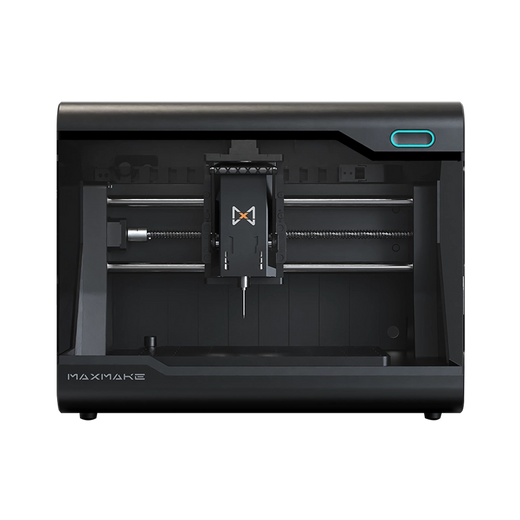
HiMill D1S - Pro Desktop CNC with Ball Screws & QTC
Connect with the MAXMAKE community
Share your projects, discover new ideas, and connect with other makers.
Join Our Community
Share projects, ask questions, connect with makers