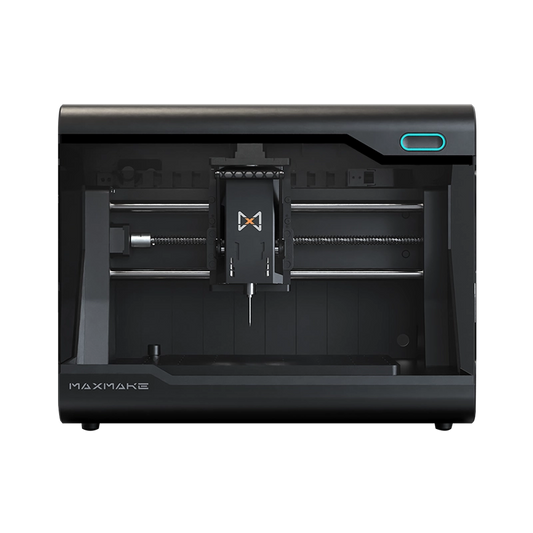
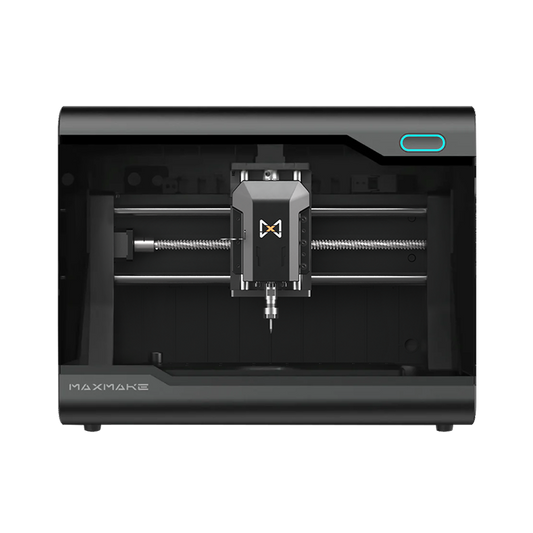
HiMill D1 vs D1S: Desktop CNC Machine Comparison | MAXMAKE
Table of Contents
The launch of the MAXMAKE HiMill series has sparked a common question among creators and CNC enthusiasts: HiMill D1 vs D1S—what’s the real difference, and which one is right for my projects?
The short answer? Both machines are built to deliver the reliable desktop CNC performance MAXMAKE is known for. The choice ultimately comes down to your materials, workflow efficiency, and precision requirements.
In this guide, we’ll break down the key differences between the HiMill D1 and D1S—spindle, motion system, precision, workflow, and price—to help you decide which machine best fits your needs.
HiMill D1 and D1S at a Glance
| Feature | HiMill D1 | HiMill D1S |
|---|---|---|
| Spindle | 250W Air-Cooled Brushed | 250W Air-Cooled Brushless |
| Transmission | Linear Shafts + Anti-Backlash Lead Screws | Linear Shafts/Rails + Precision Ball Screws |
| Tool Change | Standard ER11 (Manual) | Quick Tool Change (QTC) System |
| Listed Repeat Positioning Precision | <0.01 mm | <0.01 mm |
| Listed Spindle Runout | <0.02 mm | <0.01 mm |
| Listed Screw Backlash | <0.04 mm | <0.02 mm |
| Non-Ferrous Metal Workflow | Reliable performance with suitable tooling and machining parameters. | Enhanced motion stability and efficiency for more demanding, multi-tool metal work. |
| Price | $999 | $1,299 |
| Best For... | Makers seeking reliable all-around CNC capability and the best overall value. | Users seeking higher efficiency, ultra-low backlash, and faster multi-tool workflows. |

Shared Core CNC Capabilities
Both the D1 and D1S support a wide range of maker and prototyping materials when paired with suitable tooling and MAXMAKE's recommended machining parameters. Whether you are working with:
Both machines can produce clean, accurate parts for a wide range of maker, prototyping, and small-project applications.
Not sure which material your project needs? Check our CNC material selection guide for recommended tools, feeds, and setup per material.
The D1S builds on the same capable cutting platform with hardware upgrades designed to improve motion control, tool-changing efficiency, and workflow stability during more demanding machining jobs.
Unified MAXMAKE Ecosystem
Both models operate within the same MAXMAKE ecosystem, which includes:
From digital design to the finished part, users can expect the same familiar MAXMAKE workflow, with the D1S adding a faster QTC tool-changing experience and upgraded motion hardware.

Difference #1: Spindle Technology & Tool Change System
One of the most noticeable operational differences between the two machines lies in the spindle system.
HiMill D1: 250W Air-cooled Brushed Spindle
The D1 features a 250W air-cooled brushed spindle paired with a standard ER11 collet.
This setup provides consistent torque for machining wood, plastics, and non-ferrous metals. Tool changes are performed manually using two wrenches—a proven and widely adopted industry standard that delivers reliable results for everyday maker projects.
HiMill D1S: Brushless Spindle with QTC
The D1S upgrades to a 250W air-cooled brushless spindle.
The brushless design supports quieter operation and avoids brush wear as a motor component. More importantly, the D1S incorporates a Quick Tool Change (QTC) system. Instead of using two wrenches, users can swap bits in seconds with a mechanical pull lever.
Why Does This Matter?
Imagine a situation where your project requires multiple operations, such as:
With the HiMill D1, conventional manual tool changes require the user to confirm tool length and the Z-axis zero whenever the tool stick-out changes.
By contrast, the D1S's QTC system can reduce a typical tool change from minutes to seconds.
While both machines support the same core material range, the D1S reduces physical tool-change time and simplifies complex, multi-tool workflows.
Difference #2: Motion System & Accuracy
The second major difference lies in the motion drive system.
HiMill D1: Anti-Backlash Lead Screws
The D1 utilizes hardened linear shafts paired with anti-backlash lead screws. This mechanical design effectively minimizes play, delivering less than 0.04 mm backlash.
This setup is widely adopted in the desktop CNC industry because it offers:
For woodworking, acrylic cutting, and general DIY projects, anti-backlash lead screws remain a highly capable and trusted solution.
HiMill D1S: Precision Ball Screws & Linear Guide Rails
The D1S upgrades the motion system with Precision Ball Screws and Linear Guide Rails. This combination reduces mechanical friction and improves transmission efficiency.
Key advantages include:
These advantages become more noticeable during longer machining jobs, multi-operation projects, and more demanding non-ferrous metal applications.

Difference #3: Precision in Real Projects
A common question is whether the D1S is significantly more accurate than the D1. The practical difference comes from the motion and spindle hardware used in each machine.
For General Projects (Wood & Plastics):
When machining wood, MDF, or acrylic, the HiMill D1’s listed <0.04 mm backlash and <0.02 mm spindle runout are well suited to general maker projects. For many hobbyist applications, both machines can produce clean and consistent results, while the D1S upgrades become more valuable as project demands increase.
For Precision Metal Machining:
This is where the D1S shines. The combination of Precision Ball Screws, Linear Guide Rails, and a brushless spindle gives the D1S listed screw backlash of <0.02 mm and spindle runout of <0.01 mm. These upgraded specifications can support smoother edge finishes and more consistent results when tooling, workholding, and machining parameters are properly set. The hardware upgrades are why the D1S costs $300 more than the D1—and why it is a strong choice for regular aluminum, brass, or copper work where motion consistency and multi-tool efficiency matter most. See our desktop CNC for metal buying guide for a wider comparison.
Difference #4: Workflow Efficiency
Beyond hardware specifications, another important difference is how each machine fits into different workflows.
For most everyday projects, both the HiMill D1 and D1S deliver reliable machining performance and excellent results.
As projects involve more machining operations and more frequent tool changes, the HiMill D1S offers a smoother workflow. Its Quick Tool Change (QTC), Precision Ball Screws & Linear Guide Rails, and brushless spindle help make extended machining sessions more efficient and consistent.
Put either machine to work with our 10 desktop CNC projects for beginners—each one lists the exact tools and settings you need.

Which One Should You Choose?
Choosing between the HiMill D1 and D1S isn't about choosing the "better" machine—it's about choosing the one that best fits the way you work.
HiMill D1 may be the better fit if you:
HiMill D1S may be the better fit if you:
Frequently Asked Questions (FAQ)
What is the difference between the HiMill D1 and D1S?
The four key differences are the spindle (250W brushed vs 250W brushless), the motion system (anti-backlash lead screws vs precision ball screws with linear guide rails), the tool change (conventional manual ER11 tool change vs the Quick Tool Change lever), and price ($999 vs $1,299). Both models share the same MAXMAKE platform and software environment, while spindle-specific collets and tool-holding components should match the selected model.
Is the HiMill D1S worth the extra money?
If you frequently machine aluminum or copper, switch between multiple tools, or run repeated multi-operation jobs, the $300 premium buys the QTC system, precision ball screws, and a brushless spindle that make the workflow faster and more consistent. If most of your work is wood, acrylic, and one or two tools per project, the HiMill D1 delivers the same capable platform for less.
Can the HiMill D1 cut aluminum?
Yes. With its 250W air-cooled brushed spindle and anti-backlash lead screws (under 0.04 mm backlash), the D1 is capable of machining aluminum when you use suitable tooling and MAXMAKE’s recommended parameters. The D1S is the stronger choice for longer or more tool-intensive non-ferrous metal workflows, with upgraded motion hardware and a brushless spindle.
What is the Quick Tool Change (QTC) system?
QTC is exclusive to the HiMill D1S. Instead of relying on a conventional two-wrench tool change, users can swap tools in seconds with a mechanical pull lever. The system reduces manual setup time and makes multi-tool jobs more efficient, while correct tool length and Z-axis setup should still be confirmed as needed.
What materials can the HiMill D1 and D1S machine?
Both machines handle wood, plastics, acrylic, carbon fiber, copper, aluminum, and brass with suitable tooling and machining parameters. The D1S’s precision ball screws, linear guide rails, and brushless spindle make it the stronger choice for demanding non-ferrous metal work and multi-tool workflows.
Wrapping Up
Both the HiMill D1 and D1S are built on the same MAXMAKE platform and share the same goal: making capable desktop CNC machining more accessible.
HiMill D1 delivers an excellent balance of performance, precision, and value for everyday makers.
HiMill D1S builds on that foundation with a brushless spindle, QTC, precision ball screws, and linear guide rails for smoother workflows, lower listed backlash and spindle runout, and greater efficiency when projects become more demanding.
Whichever model you choose, you'll be working within the same MAXMAKE ecosystem—with the same software environment, shared support resources, and a tooling setup designed for your chosen machine.
Related reading: HiMill D1S review · Best desktop CNC machines for 2026 · CNC feeds & speeds guide

HiMill D1 Desktop CNC Machine
Connect with the MAXMAKE community
Share your projects, discover new ideas, and connect with other makers.
Join Our Community
Share projects, ask questions, connect with makers