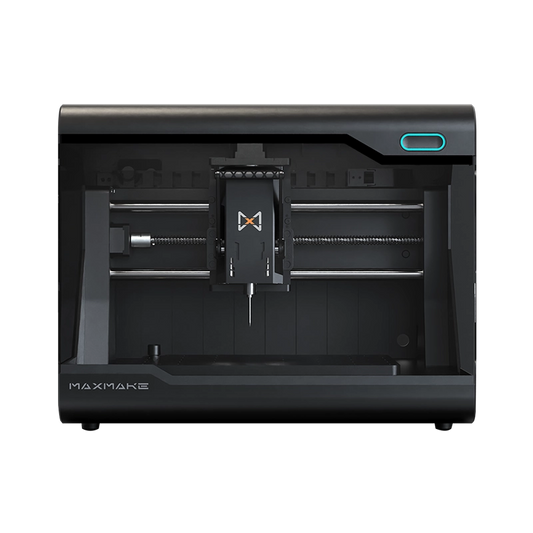
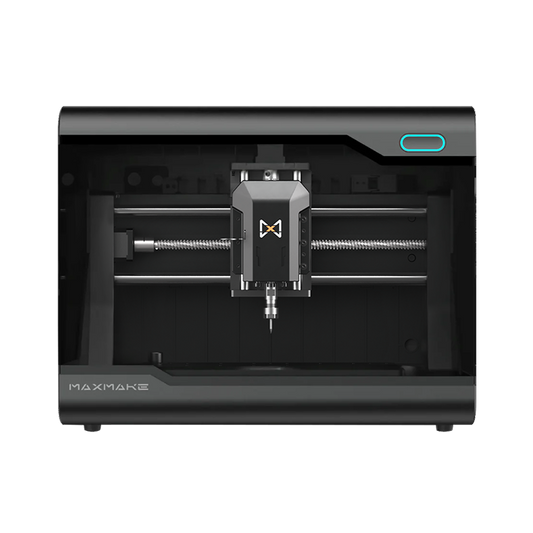
HiMill D1S Review: A Professional Desktop CNC for Aluminum Machining
In this HiMill D1S review, we compare this advanced desktop CNC for aluminum with the entry-level machines most makers start with. Built around a one-piece cast aluminum frame, precision ball screws, and a quick tool change system, the HiMill D1S is a professional desktop CNC for makers who have outgrown their engraving-style machines. We cover its specs, real aluminum machining projects, workflow, market positioning, limitations, and target users — so you can judge whether it is the right upgrade for your workshop.
1) Why Aluminum Machining Pushes Desktop CNC Limits
If you are looking for a desktop CNC for aluminum, you may already know the frustration: wood and acrylic cut cleanly, but aluminum brings vibration, burrs, uneven tool marks, and inconsistent holes and dimensions. The problem is rarely your technique. Most entry-level machines are built as lightweight engraving tools, and their limits show up quickly once your projects grow into real functional parts.
The HiMill D1S is built to break through those limits. It packs a metalworking-grade frame and motion system into a desktop footprint, shifting the question from "Can it cut aluminum?" to "Can it reliably produce functional parts?" Its core promise: Build Bigger. Cut Stronger. Create More.

2) Desktop CNC Milling Machine Specs That Matter for Aluminum
To judge whether a desktop CNC milling machine can handle aluminum reliably, do not look only at spindle wattage. What matters more is structural rigidity, drive stability, usable work space, and how smoothly a multi-step workflow runs. The HiMill D1S specs are built around exactly these five points (to see the complete specifications, please visit our Wiki to read the full HiMill D1S introduction):
- Working area: 280×200×80 mm (max clearance height 82 mm). The benefit isn't just bigger parts — it's easier workholding. Aluminum parts usually need clamps, spacers, or a machine vise, and Z clearance is often consumed by the fixture. The D1S specifies its clearance explicitly, so you can judge whether your part still fits after workholding is in place.
- Rigidity: One-Piece Cast Aluminum Frame. Vibration is the enemy of cutting aluminum: it causes messy tool marks, burrs, and inconsistent holes and steps. A one-piece cast aluminum frame improves rigidity and vibration damping, keeping cutting forces predictable.
- Motion System: Ball Screws and Backlash Claims. For functional parts, backlash and repeatability matter more than speed. Ball screws stay stable during direction changes, circular interpolation, and contour finishing — holes come out round and dimensions stay consistent.
- QTC: Quick Tool Change for Multi-Operation Parts. Complex aluminum parts typically need roughing, finishing, chamfering, and drilling with frequent tool changes. QTC is not just about saving time; it reduces the errors caused by repeated tool changes and touch-offs, making multi-step machining smoother and safer.
- Enclosure + Chip Control for Desktop Use. In a studio or indoor environment, noise and chip control often determine how much you actually use the machine. The enclosure keeps flying chips contained and pairs well with a dust collection setup to keep your workspace usable long-term.
In short: the D1S is built to cut aluminum functional parts reliably and keep multi-step workflows smooth — not to win a spec-sheet contest.
3) HiMill D1S Aluminum Machining Projects (Real Parts & Results)
The fastest way to judge whether a machine is worth buying is to look at its finished parts. For anyone searching for the best desktop CNC for aluminum machining, here is what the HiMill D1S actually produces (you can explore more user creations in our Project Ideas gallery):
Aluminum 3D Finishing: Detail and Surface Quality
These projects involve long 3D surface finishing sessions that demand tight tool-mark control and surface quality. The D1S maintains consistent motion accuracy even under long, high-load cutting, giving aluminum surfaces a fine, metallic finish.


Pockets and Stepped Parts: Enclosures and Cavities
Deep pockets and multi-level steps are classic tests of machine rigidity. The D1S maintains high sidewall perpendicularity and flat bottom surfaces in these jobs — for electronic enclosures or mechanical boxes that must be assembled, these indicators determine whether the part is usable at all.


Mixed-Material Builds: Fit and Tolerance Work
When a single piece combines metal and wood, tolerance matching is the hard part. The D1S maintains extremely consistent tolerances in inlay and sliding-fit work between softwood and metal, giving finished pieces a polished, product-ready feel.


4th Axis Potential: Cylinders, Indexing, and Complex Geometry
With an external 4th axis, the D1S performs synchronized machining of cylindrical surfaces, extending beyond ordinary 3-axis machines to jewelry, rotational parts, and other advanced shapes.


4) Workflow and Software Environment (MaxmakeLAB + QTC)
With complex aluminum parts, the real time sink is rarely the cutting itself — it's whether the whole chain, from modeling and toolpaths to tool setup and changes, flows smoothly. The HiMill D1S takes a turnkey approach: the machine ships with the matching MaxmakeLAB software, which integrates common CAD modeling and CAM toolpath functions, so beginners and advanced users alike can avoid juggling multiple software packages and compatibility headaches. If you need to download the software or learn more, please check out the MaxmakeLAB software page on our Wiki.
To be fair, MaxmakeLAB is still maturing. Its strength is consistency and a short learning curve, letting you focus on the part instead of the toolchain.
In addition, the D1S's QTC quick tool change noticeably improves multi-step machining: when roughing, finishing, and chamfering require frequent swaps, the lever-lock mechanism switches tools quickly, reducing the interruptions and errors caused by repeated tool changes and touch-offs.
5) Where the D1S Fits in the Desktop CNC Market
To see where the HiMill D1S sits, it helps to group common desktop CNCs into four tiers by purpose:
-
1) Beginner CNC (e.g., 3018-class machines)
- Good for: learning the workflow, engraving and light cutting of wood, acrylic, and plastic.
- Not good for: long-term, stable aluminum functional parts (they usually lack rigidity and drive stability). -
2) Precision Maker CNC (e.g., machines like the Makera Z1)
- Good for: jewelry, small precision parts, detail-first projects.
- Not good for: larger functional parts and enclosures (usually constrained by work area and speed). -
3) Advanced Maker CNC — where the HiMill D1S sits
- Good for: aluminum, brass, and other non-ferrous functional parts, prototyping, and small-batch practical parts.
- Not good for: industrial-scale production throughput. -
4) Workshop / Professional CNC (e.g., Tormach-class machines)
- Good for: higher material removal rates, clearer small-batch production, and long-term use.
- Not good for: personal desktop scenarios with limited budget, space, power, or support.
In short: choose a precision machine for small, detailed work, the D1S tier for functional parts, and workshop-grade equipment for production throughput. If you are weighing a HiMill D1S vs entry-level CNC, the D1S's advantage is rigidity, workspace, and capability.
6) HiMill D1S Limitations
A balanced look at the HiMill D1S limitations:
- Not for production lines: it is built for prototyping and one-off or small-batch parts, and cannot match the throughput of industrial machining centers.
- Not for heavy steel machining: the official guidance is aluminum, brass, copper, and similar non-ferrous metals. Steel is theoretically possible but at very slow feeds and is not recommended as a long-term workflow.
- Physical footprint: a larger work area means a bigger footprint than compact machines like the Z1 — you need a dedicated workbench space.
7) Who Is HiMill D1S For?
Who Should Buy the HiMill D1S
- Makers upgrading from digital fabrication: you have used 3D printers, laser cutters, or other desktop tools and now want to move into metal functional parts and higher-fidelity prototypes.
- Engineers: need quick aluminum brackets, connectors, jigs, fixtures, and assembly locating parts to validate structure, installation, and reliability.
- Product designers: want to push designs from models to testable prototypes, especially projects that need real material performance — aluminum, brass — to validate feel, strength, and fit.
- Prototype makers: often do small-batch sampling or multi-version iteration and value repeatable results and workflow efficiency (workholding, tool setting, tool changes, chip removal).
- Small workshops: have a fixed workbench, want stable metal cutting without heavy industrial equipment, and appreciate the cleanliness and safety of an enclosed machine.
Who Should Not Buy It
- Jewelry-only, micro-engraving, or fine PCB work: these jobs are better served by precision machines, where tiny tool control, fine detail, and a compact footprint matter more than large travel and functional-part capability.
- Industrial manufacturing and production lines: if you need stable line throughput, long continuous runs, strict process control, and higher material removal rates, desktop machines are usually not the right tool.
- High-volume production: when you need mature automation, tool management, quality control, and maintenance systems, the investment should go to higher-grade professional equipment.
Final Verdict: Is HiMill D1S Worth It for Aluminum Machining?
If you are in any of these situations, the answer to "Is the HiMill D1S worth it?" is a clear yes:
- Your parts regularly do not fit, or the Z clearance is too low to add a machine vise.
- You are tired of the high-pitched whine of hobby machines cutting aluminum and want clean, smooth surfaces.
- You change tools often and cannot stand wrench-based tool changes and repeated touch-offs.
Final verdict: The HiMill D1S is a machine built to produce parts — not one you buy to learn about machining. If you want to evolve from an engraving hobbyist into a prototype engineer, with a larger work area and steadier metal cutting, the D1S is one of the most cost-effective upgrade paths for a desktop CNC milling machine.
Frequently Asked Questions (FAQ)
Q1: Can the HiMill D1S really machine aluminum?
A: Yes. Aluminum is one of the key materials the HiMill D1S is designed to machine. Its rigid cast aluminum frame, ball screw drive system, and precise motion control provide the stability needed for aluminum milling. It is well suited for aluminum prototypes, functional parts, brackets, enclosures, and other small components. As with any desktop CNC, tooling, workholding, feeds, speeds, and depth of cut all affect the final result.
Q2: Is the HiMill D1S good for hobbyists and beginners?
A: Yes, but beginners should expect a learning curve. The D1S comes fully assembled, making the initial setup much easier than building and tuning a CNC from scratch. You will still need to learn basic CAD/CAM, tool selection, workholding, and cutting parameters. For hobbyists who want to progress from simple projects to aluminum machining and functional parts, the D1S provides plenty of room to grow.
Q3: How loud is the HiMill D1S?
A: The HiMill D1S is not silent, but its enclosed design helps contain machining noise and vibration. The rigid cast frame also helps reduce vibration during cutting. Actual noise levels vary depending on the material, tooling, spindle speed, and cutting conditions, so aluminum machining will still be clearly audible. The enclosure also helps contain chips and dust, which is particularly useful when machining aluminum.
Q4: Is the HiMill D1S worth it?
A: For the right user, yes. If you only need to engrave wood or acrylic, a simpler CNC may be a better fit. But if you want to machine aluminum, produce functional parts, or build prototypes on a compact desktop CNC, the D1S offers a strong balance of rigidity, precision, working area, and workflow convenience. Its 280 × 200 × 80 mm work area, cast aluminum frame, ball screw drive system, and Quick Tool Change system make it particularly well suited to makers, engineers, educators, and small workshops looking for more capability than a basic hobby CNC.
Q5: What are the pros and cons of the HiMill D1S?
| Pros | Cons |
|---|---|
|
|
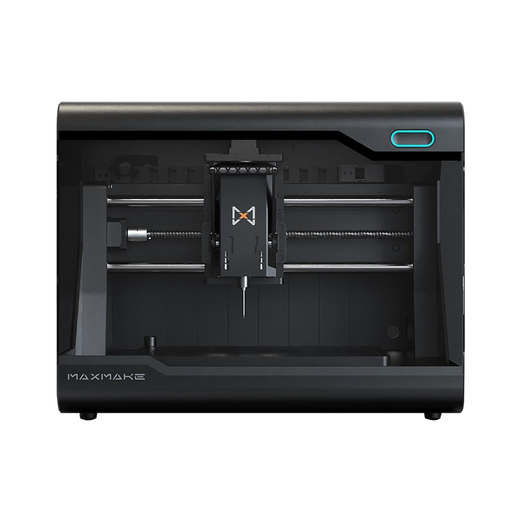
HiMill D1S - ボールねじとQTCを備えたプロフェッショナルデスクトップCNC
Connect with the MAXMAKE community
Share your projects, discover new ideas, and connect with other makers.
Join Our Community
Share projects, ask questions, connect with makers